TOP CUSTOMER REVIEW
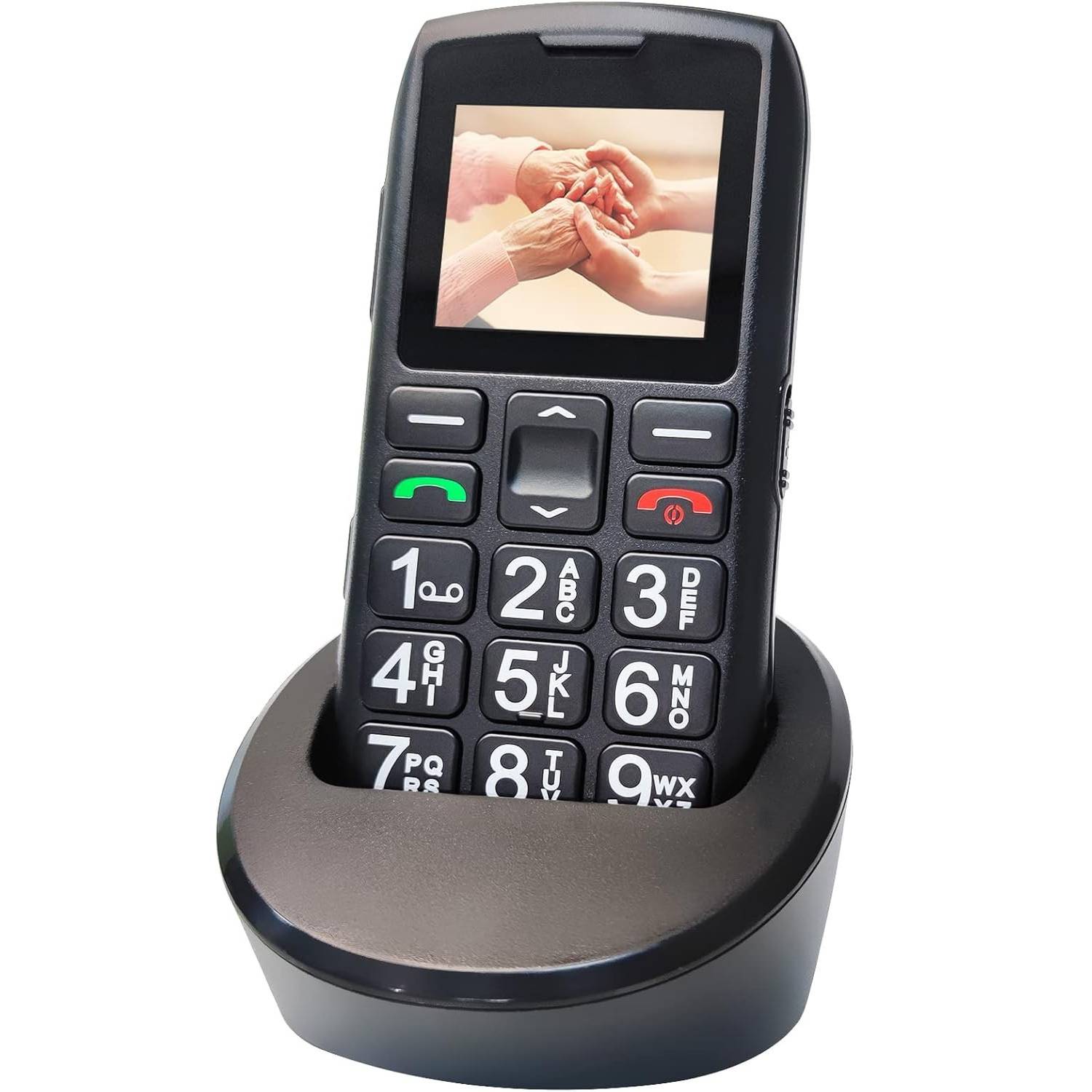
Purchased as a replacement for my 91 year old client. The charge dock works perfectly and VERY easy to make sure the phone charges when dropped in. Buttons large, screen okay, volume good, great price point, and VERY simple. I recommend this if all you want is to make and receive phone calls.
Morry
Mobile Phones For Seniors | Mobile Phone For Elderly | Big Button Mobile Phone
Original price was: $199.$179Current price is: $179.
FREE FAST DELIVERY ACROSS NEW ZEALAND FOR ALL ORDERS $75+ OR MORE - (Save $25)
The C1+ is a straightforward keypad phone focused on calls and SMS, without the complexity of a smartphone.
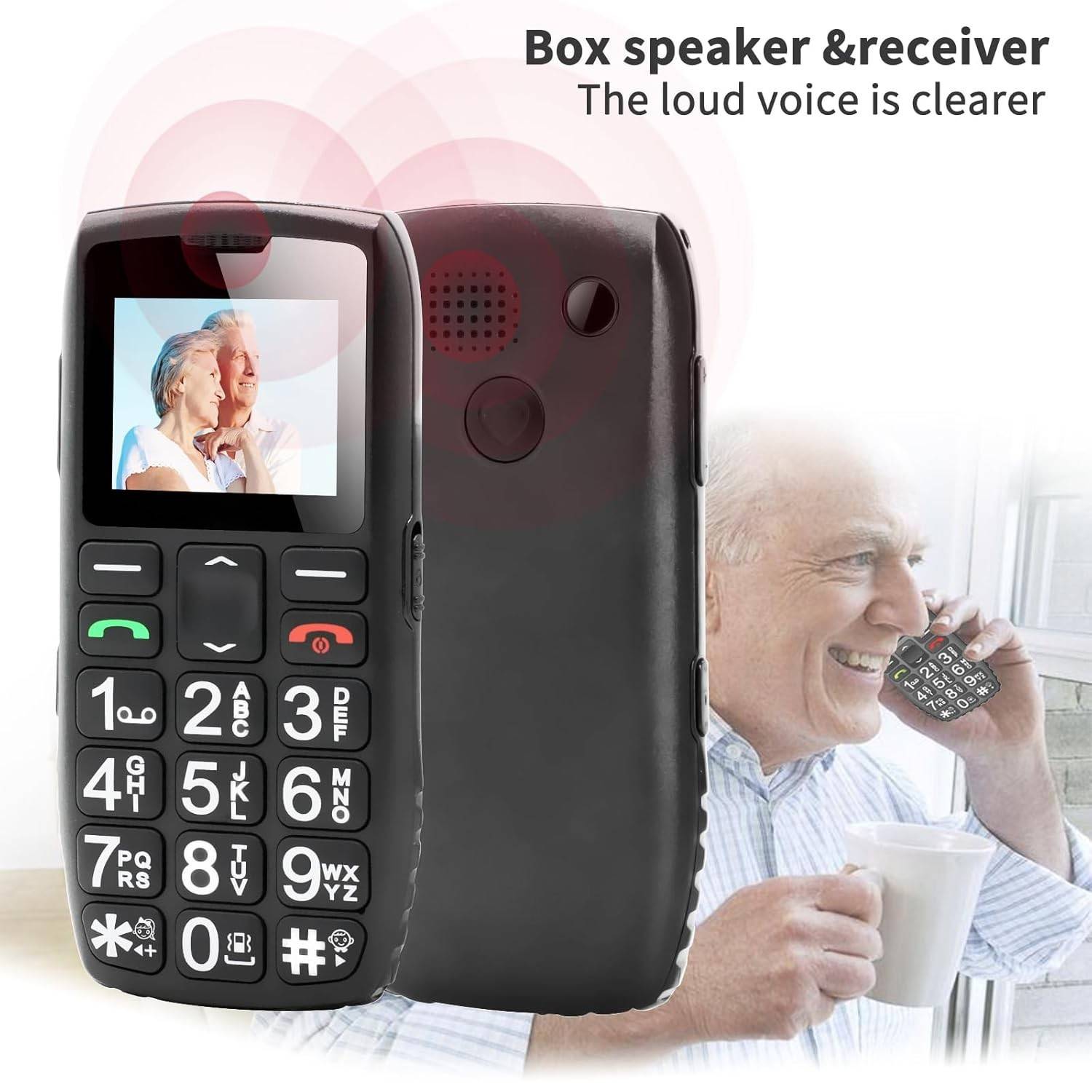
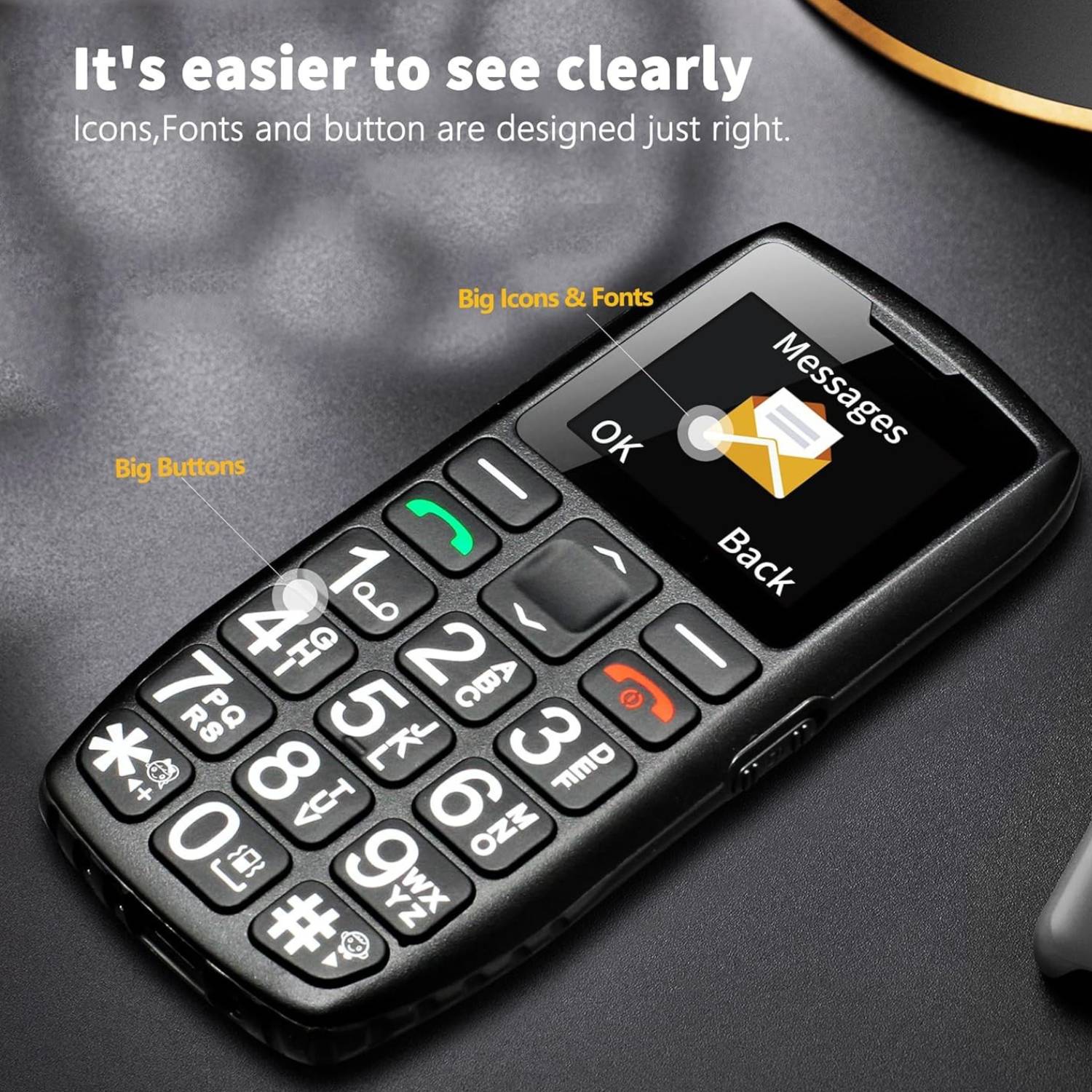
Every detail has been considered with older users in mind, from the oversized backlit keys to the non slip grip and lanyard hole.
EVERYDAY EXTRAS
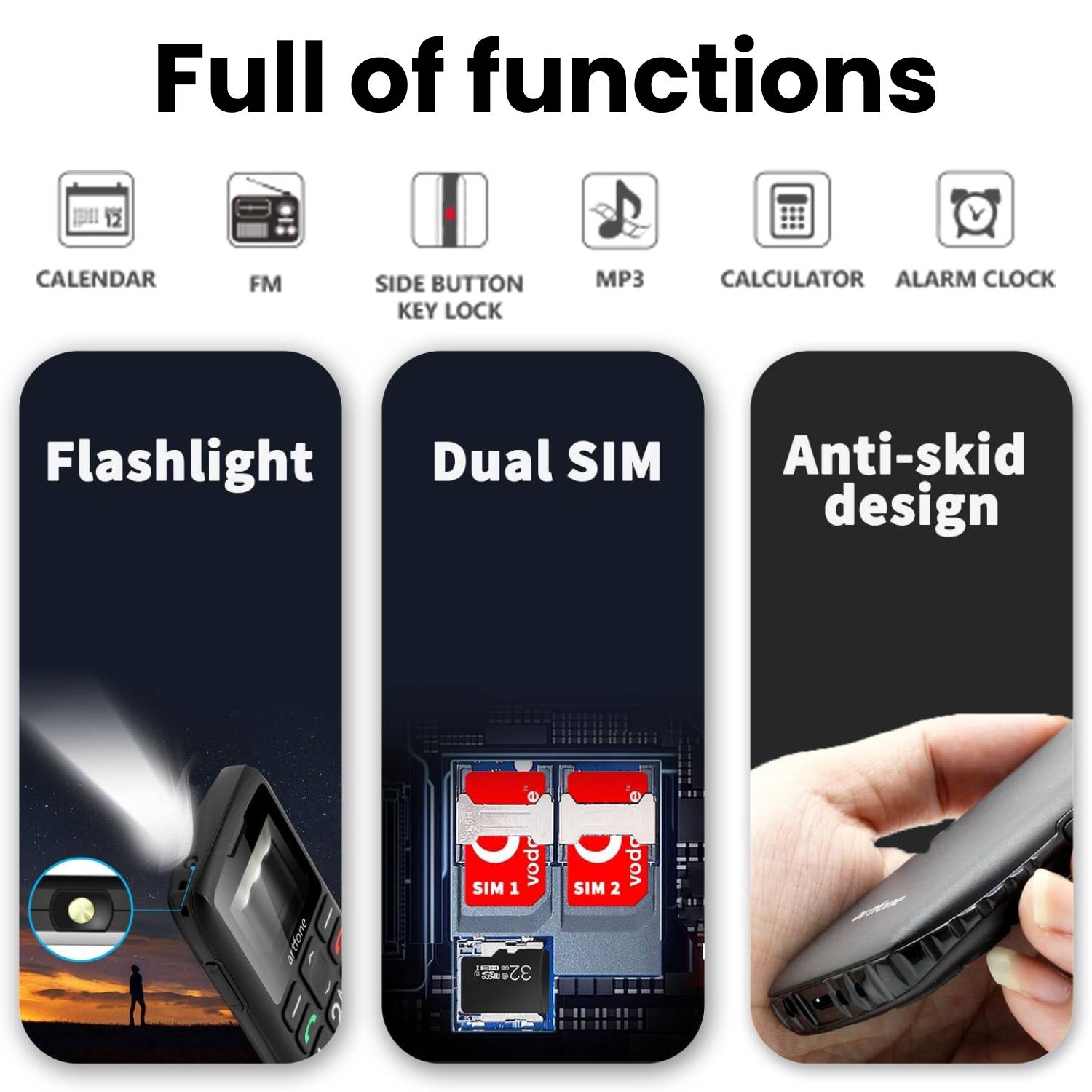
- Side-button flashlight — press and hold the left side button to light your path at night
- Hands-free calling — speakerphone mode for comfortable conversations
- FM radio — listen with the included 3.5mm headphone jack
- Bluetooth connectivity
- Calculator
- Audio & MP3 playback with USB storage mode
- Expandable storage — supports Micro SD cards up to 64 GB (not included) for music and audio files
- 3.5mm headphone jack
- Key lock/unlock to prevent pocket dialling
SPECIFICATIONS

TECHNICAL SPECIFICATIONS
- Display 1.77-inch colour screen
- Battery: 1,800mAh with overcharge protection
- Memory: 32MB + 48MB internal
- Storage: Up to 64GB via Micro SD (not included)
- SIM: Single Nano SIM (not included)
- Network: 4G / 3G / 2G
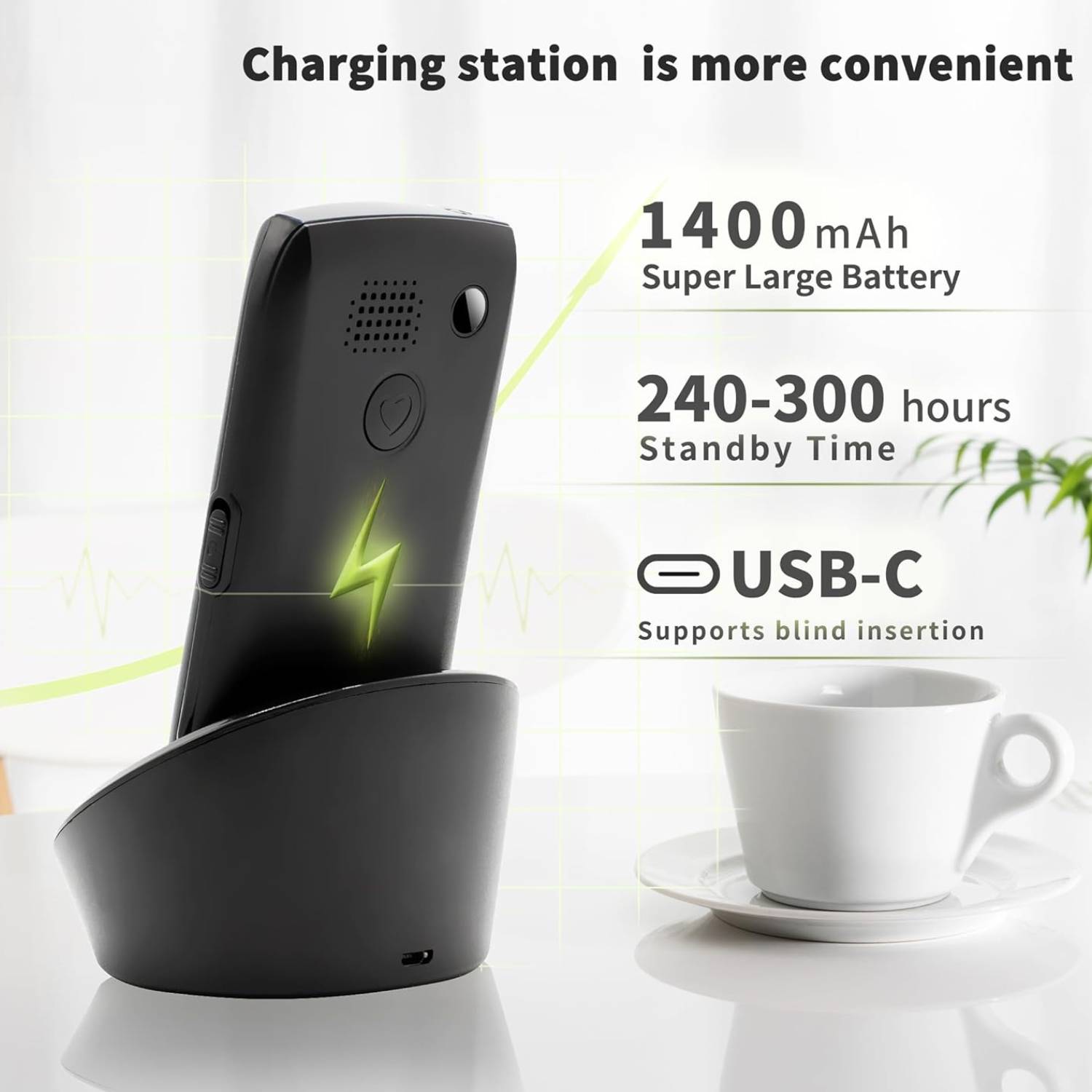
- Charging: USB-C cable + charging dock
- Dimensions: 112.1 × 59.3 × 13.9 mm
- Camera: None
- Language: English (default), additional languages in settings
Recommended carrier: Telstra. No contract required — choose any compatible pla
DUE TO CURRENT DEMAND PLEASE ALLOW 5-7 DAYS DELIVERY
Direct To Your Door - All Across New Zealand
Original price was: $199.$179Current price is: $179.
Specifications
- Display 1.77-inch colour screen
- Battery: 1,800mAh with overcharge protection
- Memory: 32MB + 48MB internal
- Storage: Up to 64GB via Micro SD (not included)
- SIM: Single Nano SIM (not included)
- Network: 4G / 3G / 2G
- Charging: USB-C cable + charging dock
- Dimensions: 112.1 × 59.3 × 13.9 mm
- Camera: None
- Language: English (default), additional languages in settings
Recommended carrier: Telstra. No contract required — choose any compatible pla
Simple, Senior-Friendly Design
One-Touch SOS Protection
Long-Lasting 1,800mAh Battery
Practical Everyday Features
Good to Know
- Accepts a single Nano SIM (no contract required — choose any compatible carrier plan)
- Default language is English, with additional languages available in settings
- No camera
- If the phone doesn’t power on after inserting the battery, simply charge it first
- If the SIM isn’t recognised, double-check that it’s inserted correctly
Frequently Asked Questions
-
DO YOU HAVE A SHOP LOCATION?
We are a “online supplier”, with no physical shop or premises. In this way, we are able to pass our considerable savings directly to you.
-
WHAT ARE YOUR DELIVERY OPTIONS AND HOW LONG WILL IT TAKE?
- NEW ZEALAND: Free delivery, 5-7 days
- Other countries: Free delivery, 7-10 days
OUR DELIVERY PARTNERS

-
WHAT CURRENCY ARE THE PRICES DISPLAYED IN?
All of our prices are displayed in $NZD
-
WHICH PAYMENT METHODS ARE ACCEPTED?
We currently only accept credit card payments, PayPal & Crypto currency. More payment methods will be added in the future.
-
DO I GET A RECEIPT FOR MY ORDER?
You will be sent a receipt for your order by email after payment is made. You will also receive a confirmation email with a tracking number once your item has been shipped.
-
I HAVEN'T RECEIVED MY ORDER YET! IS IT LOST?
If you have any concerns with your order, please contact our support team by email and they will be glad to assist you. Most emails are answered within 1 business day.
Support Team: theteam@customersupport.care
-
HOW DO I KNOW IF MY ORDER HAS BEEN SHIPPED?
Once your order is shipped, it will be marked as complete in our database and you will receive a confirmation email with a tracking number.
-
Can I listen to music or radio on this phone?The C1+ supports FM radio and MP3 audio playback. You can expand storage with a Micro SD card up to 64 GB (not included) and listen through the built-in speaker or the 3.5mm headphone jack. For a seniorphone, it offers a surprising amount of entertainment value.
-
How do I charge the phone?Two methods are included: a USB-C cable for direct charging and a charging dock. The dock is especially convenient as a mobile handset for elderly users - simply place the phone on the base and it charges automatically, with no need to align small cables.
-
Which network carriers work with this phone?The C1+ works with any carrier that supports 4G, 3G, or 2G on compatible frequency bands. For Australian users, Telstra SIM is recommended for the widest coverage. As a phone for elderly mobile use, 4G support ensures the phone will continue working as older 2G and 3G networks are retired.
-
Does the keypad light up at night?Yes. The keypad illuminates automatically when the phone is in use, making every number clearly visible in low light. This is a key advantage of choosing a purpose-built big button mobile phone over a generic budget handset.
-
Can this phone be used by elderly people living alone?Yes, and that is one of its strongest use cases. The dedicated SOS button, loud speaker, long battery life, and speed dial function make the C1+ an ideal mobile phone for elderly people who live independently. It provides both communication and a layer of safety - one of the top reasons families choose mobile phones for elderly people living on their own.
-
What other features does the phone include?Beyond calls and SMS, the C1+ includes hands-free speakerphone, Bluetooth, a calculator, audio and MP3 playback, USB storage mode, key lock to prevent pocket dialling, and expandable Micro SD storage up to 64 GB. It covers the extras that matter without adding smartphone-level complexity.
-
Does the phone support Bluetooth?Yes. The C1+ includes Bluetooth connectivity, which can be used for hands-free accessories or audio devices.
-
What is the C1+ 4G and who is it designed for?The C1+ is a 4G big button mobile phone designed specifically for older adults. It focuses on the essentials - calls, SMS, and safety - with oversized backlit keys, a loud adjustable speaker, and a one-touch SOS emergency button. If you are looking for a mobile phone for seniors that is simple and reliable, the C1+ is built exactly for that purpose.
-
Is it safe to leave the phone charging overnight?Yes. The C1+ includes built-in overcharge protection that automatically stops drawing power once the battery is full, preventing overheating or battery damage during extended charging.
-
How is this different from a smartphone?Unlike a smartphone, this senior phone has no touchscreen, no apps, and no internet browser. It uses a physical keypad and a straightforward menu system. It is purpose-built as a mobile phone for elderly users who just want to make calls and send texts without the confusion of apps, notifications, and software updates.
-
What language does the phone use?The default language is English. Additional languages are available and can be changed in the settings menu. Whether you are setting up this mobile phones for elderly parents who speak another language, the option is there to switch.
-
Is this mobile phone for old age users easy to grip?Yes. The back of the phone features a textured non-slip pattern designed to increase friction and reduce the chance of drops. The compact size (112 x 59 x 14 mm) also makes the C1+ comfortable to hold for extended calls. A built-in lanyard hole allows you to attach a wrist or neck strap for extra security.
-
How do I set up the SOS contacts?Navigate to Menu, then SOS Settings, then SOS Number, enter the phone number and press Save. The process takes under a minute and we recommend a family member configures it during initial setup.
-
Does the C1+ support speed dial?Yes. You can assign frequently called contacts to keys 2 to 9 and the * and # keys, giving you up to ten one-touch speed dial numbers. Long-press any assigned key to call that person instantly - no scrolling through contact lists.
-
How many emergency contacts can I save?You can save up to five SOS phone numbers. The phone will cycle through all five in order until one of them answers the call.
-
Does the C1+ have a camera?No. The C1+ does not include a camera. It is designed purely as a calling and SMS device. For many seniors this is a benefit rather than a limitation, as it keeps the phone simple and avoids accidental photo-taking or privacy concerns.
-
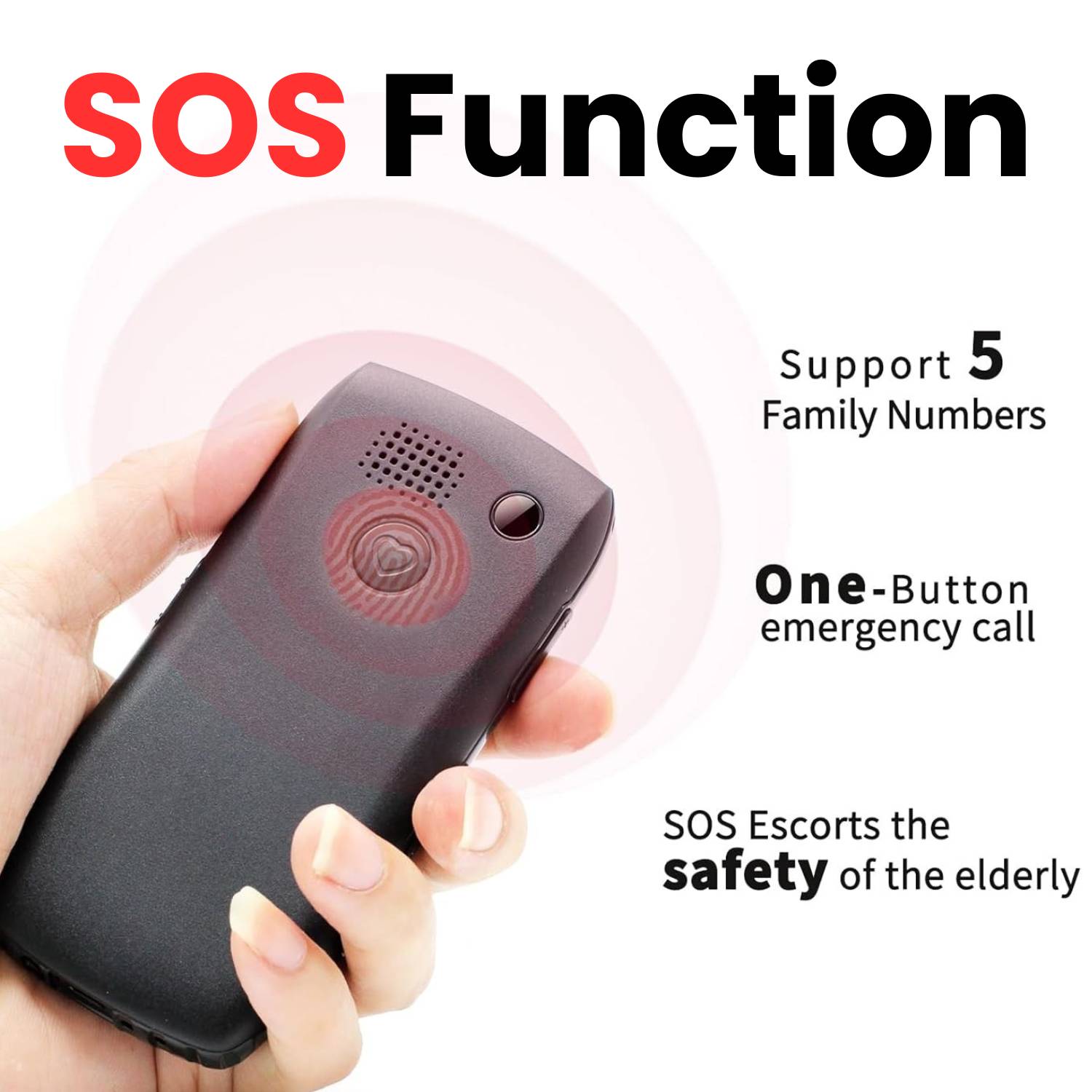
How does the SOS emergency button work?Press and hold the SOS button on the back for two seconds. The phone sounds a loud alarm to alert anyone nearby, then automatically calls up to five saved emergency contacts in sequence until someone answers. It also sends an SMS alert to all five numbers. No menus or dialling required - making it the standout safety feature of this elderly phone mobile.
-
What is voice announce dialling?Each time you press a number key, the phone speaks the digit aloud, giving you instant audio confirmation that you have pressed the correct button. This is especially useful for users with impaired vision and is a feature rarely found in other phones for elderly people at this price. It can be turned off in the settings if not needed.
-
The phone will not turn on after I insert the battery. Is it faulty?No - this is completely normal. The battery may arrive with a low charge. Simply place the phone on the charging dock or connect the USB-C cable and charge it before first use. It will power on once it has sufficient charge.
-
How does the battery compare to other mobile phones for seniors?The 1,800mAh battery is larger than most competing mobile phones for seniors in this category. Many comparable big button cell phone models offer only 800 to 1,200mAh, which means significantly shorter standby and talk times.
-
Is 4G really necessary in a mobile telephone for the elderly?Yes. Carriers worldwide are actively shutting down 2G and 3G networks. Any mobile telephones for the elderly that only support older networks may stop working within a year or two. The C1+ 4G connectivity ensures reliable service well into the future.
-
Can I turn off the SMS alert that is sent during an SOS call?Yes. The automatic SMS notification is optional and can be disabled in the SOS settings if you prefer the phone to only make calls when the SOS button is pressed.
-
Is the C1+ a good mobile phone for old people who are not tech-savvy?Absolutely. The C1+ is one of the most straightforward phones for old people on the market. The large backlit keys, voice announce dialling, and simple menu system mean most users can make calls confidently within minutes of picking it up - no instruction manual required.
-
Can I use this phone overseas?The C1+ supports multiple network bands across 4G, 3G, and 2G. Whether it works in a specific country depends on the local carrier frequency bands. Check your destination carrier supported bands before travelling.
-
What SIM card does the C1+ use?The C1+ uses a single Nano SIM card (not included). It is an unlocked, contract-free phone compatible with 4G, 3G, and 2G networks. You can choose any carrier plan that suits your needs.
-
How long does the battery last on the C1+?The upgraded 1,800mAh battery delivers 5 to 6 hours of continuous talk time and up to 9 days (120 to 216 hours) of standby time. For an elderly phone mobile used primarily for a few calls a day, most users can go a full week between charges.
-
The phone is not recognising my SIM card. What should I do?First, make sure you are using a Nano SIM and that it is inserted in the correct orientation. Remove the SIM, check for any dust or debris in the slot, reinsert it carefully, and restart the phone. If the issue persists, try the SIM in another device to confirm it is active.
-
What happens if the SOS button is pressed by accident?If the button is pressed accidentally, the call can be cancelled within three seconds. This prevents false alarms while still keeping the function instantly accessible in a genuine emergency.
-
How big are the buttons on this large button mobile phone?The keys on the C1+ are significantly larger than those on a standard handset, with bold, high-contrast printed numbers. As a large button mobile phone, the keys are designed to be readable without glasses and easy to press accurately, even for users with arthritis or reduced dexterity.
-
Does the phone have a flashlight?Yes. A side-mounted button on the left of the phone controls a built-in LED flashlight. Press and hold to turn it on or off - no need to navigate menus. It is a practical everyday feature for any mobile phone for old age users.
The Senior Phone: Why a Simple Big Button Mobile Phone Is Still the Best Choice for Older Adults
As smartphones grow more powerful and more complex every year, a quieter trend is moving in the opposite direction. Sales of mobile phones for seniors are climbing steadily — and not because older adults can’t learn new technology. It’s because many of them simply don’t want to. They want a phone that makes calls, sends the occasional text, and doesn’t require a YouTube tutorial to figure out.
If you’ve been searching for a reliable mobile phone for elderly parents or grandparents, you’ve probably noticed that the market is crowded with options that either try too hard to be smartphones or feel like cheap throwbacks from 2005. The C1+ 4G sits in a sweet spot between the two — a modern handset with 4G connectivity, a long-lasting battery, and genuine safety features, all wrapped in a design that’s refreshingly straightforward.
In this article, we’ll walk through what makes a good senior phone, why big button designs still matter, and how the C1+ stacks up as an everyday device for older users.
Why So Many Seniors Prefer a Simple Phone
There’s a common assumption that everyone wants the latest smartphone. But for a large number of older adults, a smartphone creates more problems than it solves.
Touchscreens can be difficult to use for anyone with reduced dexterity, tremors, or dry skin. App notifications are confusing and intrusive. Battery life on modern smartphones rarely lasts more than a day. And when something goes wrong — an accidental setting change, a pop-up that won’t close — there’s often no obvious way to fix it without help.
Mobile phones for elderly people address these frustrations by stripping the experience back to essentials. No apps to manage. No software updates that rearrange the interface overnight. No accidental video calls. Just a phone that works the way a phone should.
That’s exactly the philosophy behind the C1+ — and it’s why phones for elderly users with this kind of focused design continue to outsell entry-level smartphones in the senior market.
What to Look for in a Mobile Phone for Old People
Not all phones for old people are created equal. Some are so basic they don’t even support modern networks, which means they’ll stop working as carriers retire older infrastructure. Others have good specs on paper but poor execution — tiny speakers, dim screens, or batteries that barely last a day.
Here are the features that genuinely matter when choosing a mobile handset for elderly users:
Physical Keypad with Large, Backlit Buttons
This is non-negotiable. A big button mobile phone isn’t just a convenience — it’s an accessibility feature. Older users with vision loss, arthritis, or reduced fine motor control need keys they can see and press with confidence.
The C1+ uses oversized keys with clearly printed numbers that are easy to read without glasses in daylight. At night, the keypad lights up automatically, so there’s no squinting or guessing in low light. Combined with the voice announce feature — which reads each number aloud as it’s pressed — the phone makes dialling about as mistake-proof as it gets.
Loud, Clear Speaker
Hearing loss is one of the most common age-related conditions, and it directly affects how usable a phone is. A good phone for elderly mobile users needs a speaker that’s powerful enough to be heard clearly, even at arm’s length.
The C1+ speaker is adjustable and, at maximum volume, can be heard from another room. That’s a meaningful difference compared to many budget handsets where “loud” still isn’t loud enough. The phone also offers three sound modes — ringing, vibration, and silent — so it can be adapted to different environments without fiddling through menus.
Modern Network Support
This is where a lot of older mobile telephones for the elderly fall short. Many budget senior phones still only support 2G or 3G, and carriers around the world are actively shutting down those networks. A phone that only works on 2G might be useless within a year or two.
The C1+ supports 4G as well as 3G and 2G fallback, which means it’s compatible with current networks and will remain functional as older infrastructure is phased out. For Australian users, it’s optimised for use with a Telstra SIM, though it works with any compatible carrier — no contract required.
SOS Emergency Function
Safety is often the primary reason families buy a mobile phone for old age users in the first place. The C1+ treats this seriously, with a dedicated SOS button on the back of the phone.
We’ll cover this feature in detail further down, because it’s one of the strongest selling points of the device.
Battery Life That Lasts Days, Not Hours
Older users are less likely to remember — or want — to charge their phone every night. A senior phone needs a battery that can comfortably last several days on standby without intervention.
The C1+ delivers on this front with an upgraded 1,800mAh battery that provides up to nine days of standby time and five to six hours of continuous talk time. That’s significantly more than most comparable elderly phone mobile handsets on the market.
A Closer Look at the C1+ 4G
Now that we’ve covered the general criteria, let’s look at how the C1+ performs across the features that matter most for older users.
Design and Build
The phone measures 112 × 59 × 14 mm — compact enough to slip into a pocket but chunky enough to hold securely. The back features a textured non-slip pattern that increases grip, which is a small but important detail for anyone whose hands aren’t as steady as they used to be.
A built-in lanyard hole allows users to attach a neck or wrist strap, making the phone easier to carry and much harder to lose. It’s the kind of thoughtful touch that separates a genuinely senior-focused device from a generic budget phone with bigger buttons glued on.
The 1.77-inch colour display is clear and uses large fonts with bold, simple menu icons. It won’t win any awards for screen technology, but that’s beside the point. It’s easy to read, and the menus are intuitive enough that most users can navigate them without a manual.
The SOS Button: Peace of Mind in One Press
For many families, the SOS feature alone justifies the purchase. Here’s how it works:
You can store up to five emergency contacts in the phone’s SOS settings. When the button on the back is pressed and held for two seconds, the phone first sounds a loud alarm — loud enough to alert anyone nearby. It then automatically cycles through each saved contact number, calling them one by one until someone answers. At the same time, it sends an SMS alert to all five numbers.
The user doesn’t need to navigate any menus, find a contact, or press the call button. They just hold one button, and the phone handles the rest. For someone who has fallen, feels unwell, or is in an unfamiliar situation, that simplicity could make a critical difference.
If the button is pressed accidentally, the call can be cancelled within three seconds — so there’s no risk of repeated false alarms. The SMS notification feature can also be turned off if preferred.
Setup is straightforward: Menu → SOS Settings → SOS Number → Enter Phone Number → Save. It can be configured in under a minute, ideally by a family member during initial setup.
Battery and Charging
The 1,800mAh battery is one of the largest you’ll find in this category of large button mobile phone. In practical terms, that means a user who makes a few calls a day and sends the occasional text can comfortably go a full week without charging.
The phone includes built-in overcharge protection, which automatically stops drawing power once the battery is full. This is a welcome safety feature — many older users leave their phones charging overnight or for extended periods, and overcharge protection removes any worry about battery damage or overheating.
Two charging options are included in the box: a USB-C cable for direct charging and a charging dock. The dock is particularly useful for seniors who find plugging in small cables fiddly — they simply place the phone on the base and it charges. No fumbling, no forced alignment.
Speed Dial
The C1+ supports speed dialling from keys 2 through 9, plus the * and # keys — giving users up to ten one-touch contacts. A long press on any assigned key immediately dials that person.
This is a feature that sounds minor but makes a huge difference in daily use. Instead of scrolling through a contact list, an older user can simply press and hold “2” to call their daughter, or “3” to call their doctor. It reduces the phone to its most essential function — connecting people — with as little friction as possible.
Voice Announce Dialling
Every time a number key is pressed, the phone speaks the digit aloud. This gives users immediate audio confirmation that they’ve pressed the right key, which is especially helpful for anyone with impaired vision.
The feature can be turned off in the settings menu for users who don’t need it or find it intrusive, but for those who benefit from it, it’s a genuinely useful accessibility tool that’s rarely found in big button cell phone models at this price point.
Flashlight
A side-mounted button on the left of the phone controls a built-in flashlight. Press and hold to switch it on or off — no menus, no unlocking the phone. For older users navigating dark hallways, checking a lock at night, or simply finding something that’s rolled under a table, it’s one of those features that gets used far more often than you’d expect.
Additional Features
Beyond the core calling and safety functions, the C1+ includes a handful of extras that add everyday value without adding complexity.
The phone supports hands-free speakerphone calls, FM radio, Bluetooth connectivity, a basic calculator, and audio playback including MP3 files. Storage can be expanded with a Micro SD card up to 64 GB — useful for loading music or radio recordings that can be played through the 3.5mm headphone jack.
A key lock function prevents pocket dialling, and the single Nano SIM slot keeps things simple — one number, one phone, no confusion.
Who Is the C1+ For?
The obvious answer is older adults who want a no-fuss phone, but it’s worth being more specific.
Seniors who live independently. The SOS function, loud speaker, and long battery life make this a practical safety tool as much as a communication device. It gives both the user and their family an added layer of reassurance.
Older adults who’ve tried and disliked smartphones. Many seniors have been given smartphones by well-meaning relatives, only to find them frustrating and overwhelming. The C1+ is a welcome step back to simplicity — a phone that does what they actually need without everything they don’t.
Caregivers and family members buying on behalf of someone else. If you’re setting up a phone for a parent or grandparent, the C1+ is easy to configure. Speed dial contacts, SOS numbers, and basic settings can all be arranged in a few minutes before handing it over.
Anyone who needs a reliable backup phone. While marketed as a seniorphone, the C1+ also works well as a secondary device — for travel, emergencies, or situations where you want a phone with a week-long battery and no distractions.
What the C1+ Doesn’t Have
Transparency matters, so let’s be clear about what’s not included.
There is no camera. For many senior users, that’s not a loss — but it’s worth knowing upfront. There’s no app store, no internet browser, and no touchscreen. The phone runs its own simple operating system, not Android or iOS.
The internal memory is modest at 32MB + 48MB, but since the phone isn’t designed for apps or media-heavy use, this is rarely a limitation. Expandable storage via Micro SD handles any music or audio file needs.
The default language is English, though other languages can be selected in the settings menu.
Setting Up the C1+ for an Older User
If you’re gifting this phone to someone else, a few minutes of setup will make all the difference.
First, insert the Nano SIM card. The phone accepts a single Nano SIM — no contract is required, so you can choose any compatible prepaid or postpaid plan. If the phone doesn’t power on immediately after inserting the battery, don’t be concerned. Simply place it on the charging dock or plug in the USB-C cable and let it charge before first use.
Next, set up the SOS contacts. Navigate to Menu → SOS Settings → SOS Number, enter up to five phone numbers, and save. Test the function once so the user knows what to expect — the loud alarm and automatic dialling sequence.
Assign speed dial contacts to keys 2 through 9. Label them clearly on a small reference card if needed — “2 = Sarah, 3 = Dr. Patel, 4 = Neighbour Jim” — and tuck it into the phone’s box or case.
Adjust the volume to a comfortable level, confirm the ringer mode is set to the user’s preference, and check that voice announce dialling is turned on if the user would benefit from it.
The entire setup process takes under ten minutes and ensures the phone is ready to use the moment it’s handed over.
Common Questions About Buying a Phone for Seniors
When families start shopping for phones for elderly people, a few of the same questions tend to come up. Here are the most common ones — and honest answers.
“Won’t they feel embarrassed using a ‘senior phone’?”
This is a fair concern, and it depends entirely on the person. Some older adults are self-conscious about using a device that looks different from what everyone else carries. Others couldn’t care less — they just want something that works.
The C1+ is a reasonably discreet device. It looks like a classic mobile phone, not a medical device. There’s no oversized red SOS label on the front, no cartoonish icons, and no patronising design language. The SOS button is on the back, out of sight. To a casual observer, it just looks like a normal bar-style handset.
If the person you’re buying for is sensitive about appearances, it’s worth letting them see the phone before you buy. But in our experience, most seniors care far more about whether they can read the screen and hear the caller than about how the phone looks to strangers.
“Is 4G really necessary?”
Yes — and increasingly so. Carriers in Australia and around the world are progressively shutting down 2G and 3G networks to free up spectrum for 4G and 5G. A mobile phone for old people that only supports 2G or 3G may work fine today but could become a paperweight within a year or two.
The C1+ supports 4G with 3G and 2G fallback, so it’s compatible with current and legacy networks. This is one area where it’s worth spending slightly more upfront to avoid having to replace the phone sooner than expected.
“What if they lose the phone?”
This is where the lanyard hole earns its keep. A simple neck strap or wrist lanyard makes the phone significantly harder to misplace. Beyond that, the phone’s loud ringer means it can usually be found by calling it — assuming the volume is set high enough, which it almost certainly will be.
There’s no GPS tracking built into the C1+, so if location monitoring is a priority, a smartphone with a tracking app may be a better fit. But for most users, a lanyard and a loud ringer solve the problem well enough.
“Can they still listen to music or the radio?”
Absolutely. The C1+ supports FM radio and MP3 audio playback, with a 3.5mm headphone jack and expandable storage up to 64 GB via Micro SD card. For seniors who enjoy listening to talk radio, music, or audiobooks, this is a genuinely useful feature — and one that many people don’t expect from a basic handset.
How the C1+ Compares to a Smartphone
It’s worth addressing this directly, because the question always comes up: why not just buy a cheap smartphone and set it to “easy mode”?
Some smartphones do offer simplified launcher modes with large icons and basic menus. And for some seniors, that’s a perfectly good solution — especially if they also want to use WhatsApp, video calling, or a camera.
But simplified modes on smartphones come with caveats. Notifications still pop up. Software still updates. The battery still drains in a day. And the moment something goes wrong — a setting gets changed, an app freezes, the simplified launcher crashes — the user is suddenly staring at a standard Android interface they don’t understand.
A purpose-built large button mobile phone like the C1+ avoids all of these issues because there’s nothing to go wrong in the first place. There are no apps to crash, no updates to install, no accounts to manage. The interface is the same today as it will be in two years. For users who genuinely just need calls and texts, this predictability is the phone’s greatest feature.
That said, if the person you’re buying for wants video calls with grandchildren or access to WhatsApp, a simplified smartphone is the better choice. The C1+ is specifically for users who don’t want or need those capabilities.
A Note on Gifting a Phone to an Older Relative
If you’re reading this article, there’s a good chance you’re buying on behalf of someone else. A few practical tips can make the transition smoother.
Set it up before you hand it over. Insert the SIM, charge the phone, configure SOS contacts, assign speed dial numbers, and adjust the volume. The less the recipient has to do on day one, the more likely they are to actually use the phone.
Write a simple one-page reference card. Not a manual — just the basics. “To call Sarah, hold down 2. To turn on the flashlight, hold the left side button. To call for help, hold the red button on the back.” Laminate it if you can, and keep it with the phone.
Don’t overwhelm them with features. The C1+ has FM radio, Bluetooth, MP3 playback, and more — but you don’t need to explain all of that on day one. Start with calls, speed dial, and the SOS button. Introduce extras later if and when the user is comfortable.
Check in after a week. A quick visit or call to see how they’re going can catch small issues — volume too low, SOS not set up correctly, charger in the wrong spot — before they become reasons to stop using the phone altogether.
Final Thoughts
The market for mobile phones for seniors isn’t about nostalgia or resistance to progress. It’s about recognising that different people have different needs — and that for millions of older adults, the best phone isn’t the most powerful one. It’s the one they’ll actually use.
The C1+ 4G is a well-thought-out big button mobile phone that gets the fundamentals right: a clear screen, loud sound, physical keys, a long battery, and a genuine emergency safety feature. It doesn’t try to be a smartphone. It tries to be the best simple phone it can be — and it succeeds.
If you’ve been looking for a dependable phone for elderly parents, grandparents, or anyone who values simplicity and safety over apps and screens, the C1+ is well worth considering.
Only logged in customers who have purchased this product may leave a review.


Reviews
There are no reviews yet.